Universe management
The Univers (Universes) tab in the administration page allows you to create, edit and manage product universes.
WARNING
This feature is restricted to administrators.
Access universe management
- From the administration page, click the Univers tab.
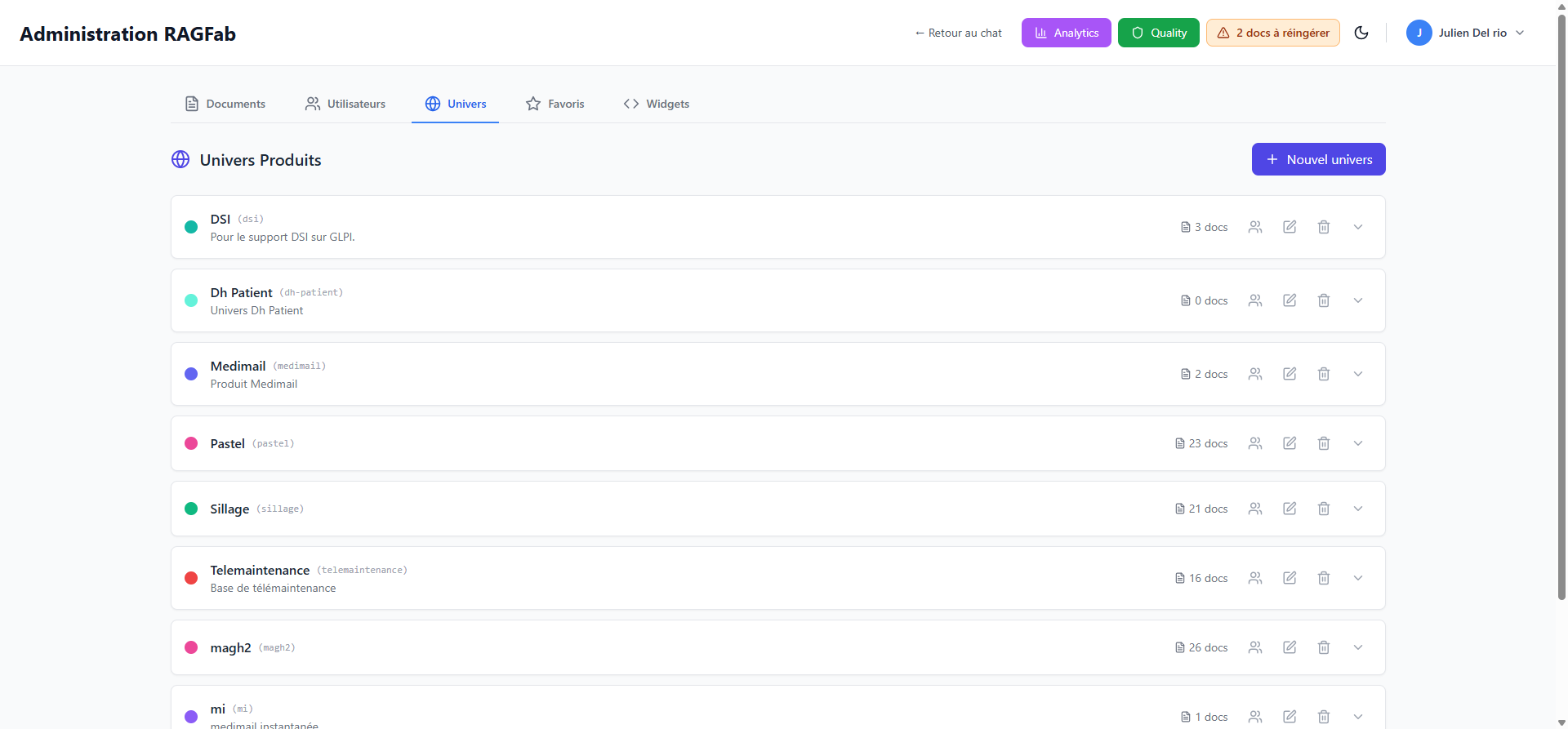
Overview
Each universe is displayed as a card with:
- Its name and technical identifier (slug)
- Its description (if provided)
- A colored indicator for visual distinction
- The number of documents associated
Create a new universe
- Click + Nouvel univers (New universe) in the top right.
- Fill in the information:
- Name: display name in the interface
- Identifier: technical ID (auto-generated)
- Description: optional description
- Color: display color
- Confirm the creation.
Universe actions
For each universe, action buttons are available on the right:
| Action | Description |
|---|---|
| Manage users | Grant or revoke user access to this universe |
| Edit | Modify name, description or color |
| Delete | Delete the universe |
| Expand | View details and associated documents |
DANGER
Deleting a universe does not delete the associated documents, but they will no longer be linked to any universe.
Assign users to a universe
- Click the users icon for the relevant universe.
- Check the users who should have access.
- Confirm.