Document management
The Documents tab in the administration page allows you to import new documents and manage existing ones.
WARNING
This feature is restricted to administrators.
Access document management
- Click your name in the top right, then Administration.
- The Documents tab is selected by default.
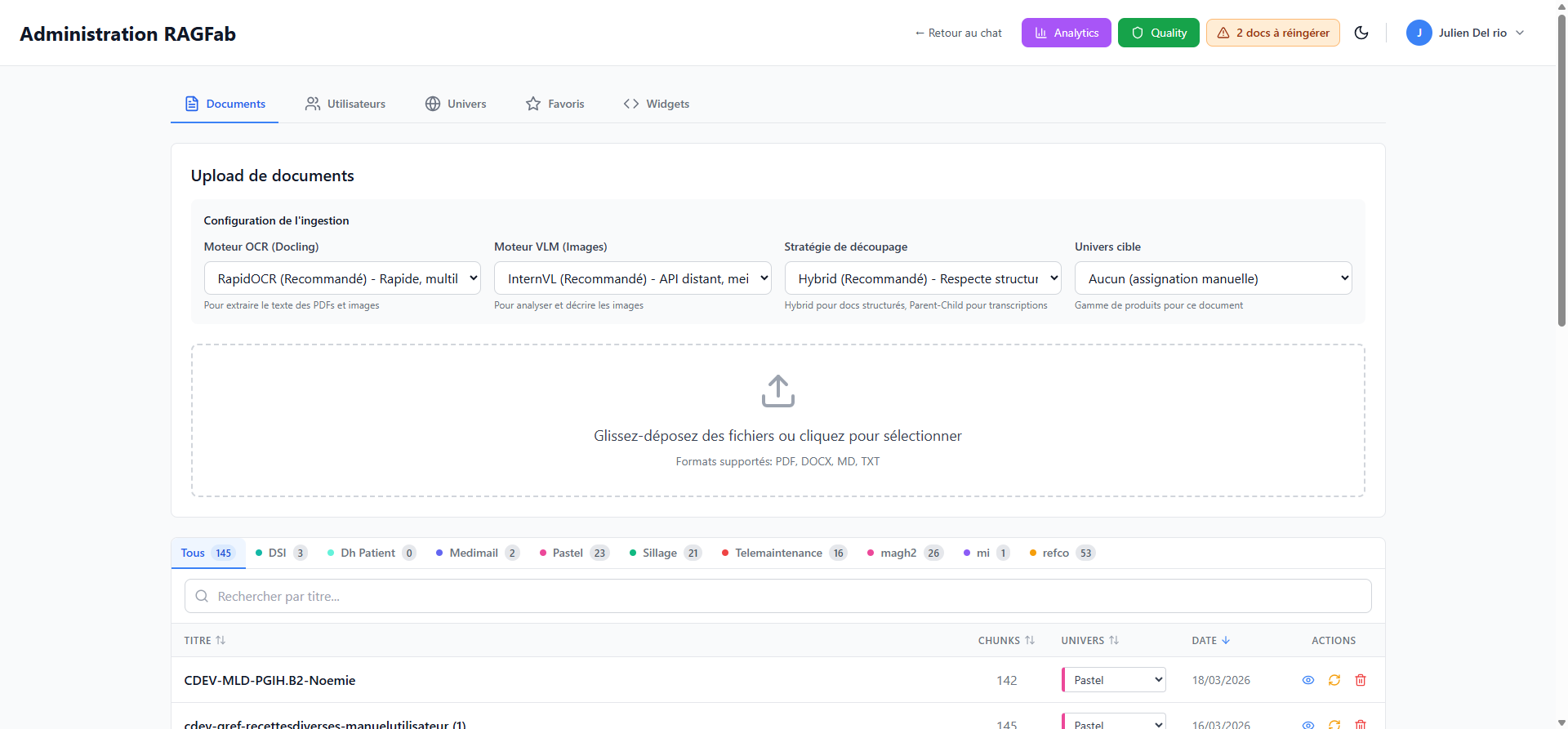
Import a document
Ingestion configuration
Before importing, configure the processing parameters:
| Parameter | Options | Recommendation |
|---|---|---|
| OCR Engine | RapidOCR, EasyOCR, Tesseract | RapidOCR (fast, multilingual) |
| VLM Engine (Images) | InternVL, Chocolatine, PaddleOCR-VL, None | InternVL (best quality) |
| Chunking strategy | Hybrid, Parent-Child | Hybrid (structured documents) |
| Target universe | List of available universes | Depends on the document |
TIP
- Hybrid is recommended for structured documents (manuals, procedures).
- Parent-Child is preferable for long narrative texts (transcriptions, reports).
Upload a file
- Click Select. fichiers (Select files) or drag and drop a file into the designated area.
- Supported formats: PDF, DOCX, MD, TXT.
- Processing starts automatically. A progress bar shows the status.
Manage existing documents
Filter by universe
Filter buttons are available above the table (e.g. All, DSI, Pastel, Sillage...). Each button shows the number of documents in the universe.
Search for a document
Use the Rechercher par titre... (Search by title) field to filter the list by name.
Document table
| Column | Description |
|---|---|
| Title | Document name |
| Chunks | Number of indexed segments |
| Universe | Associated universe (changeable via dropdown) |
| Date | Ingestion date |
| Actions | View chunks, Re-ingest, Delete |
Available actions
- View chunks: view the document's split segments
- Re-ingest: reprocess the document (useful after parameter updates)
- Delete: permanently delete the document
DANGER
Deleting a document is irreversible. All associated chunks will also be deleted.
Change a document's universe
Click the dropdown in the Universe column and select the new universe. The change is applied immediately.
Pagination
At the bottom of the table, you can:
- Choose the number of documents per page (20, 50, 100)
- Navigate between pages