User management
The Utilisateurs (Users) tab in the administration page allows you to manage accounts, roles and universe access.
WARNING
This feature is restricted to administrators.
Access user management
- From the administration page, click the Utilisateurs tab.
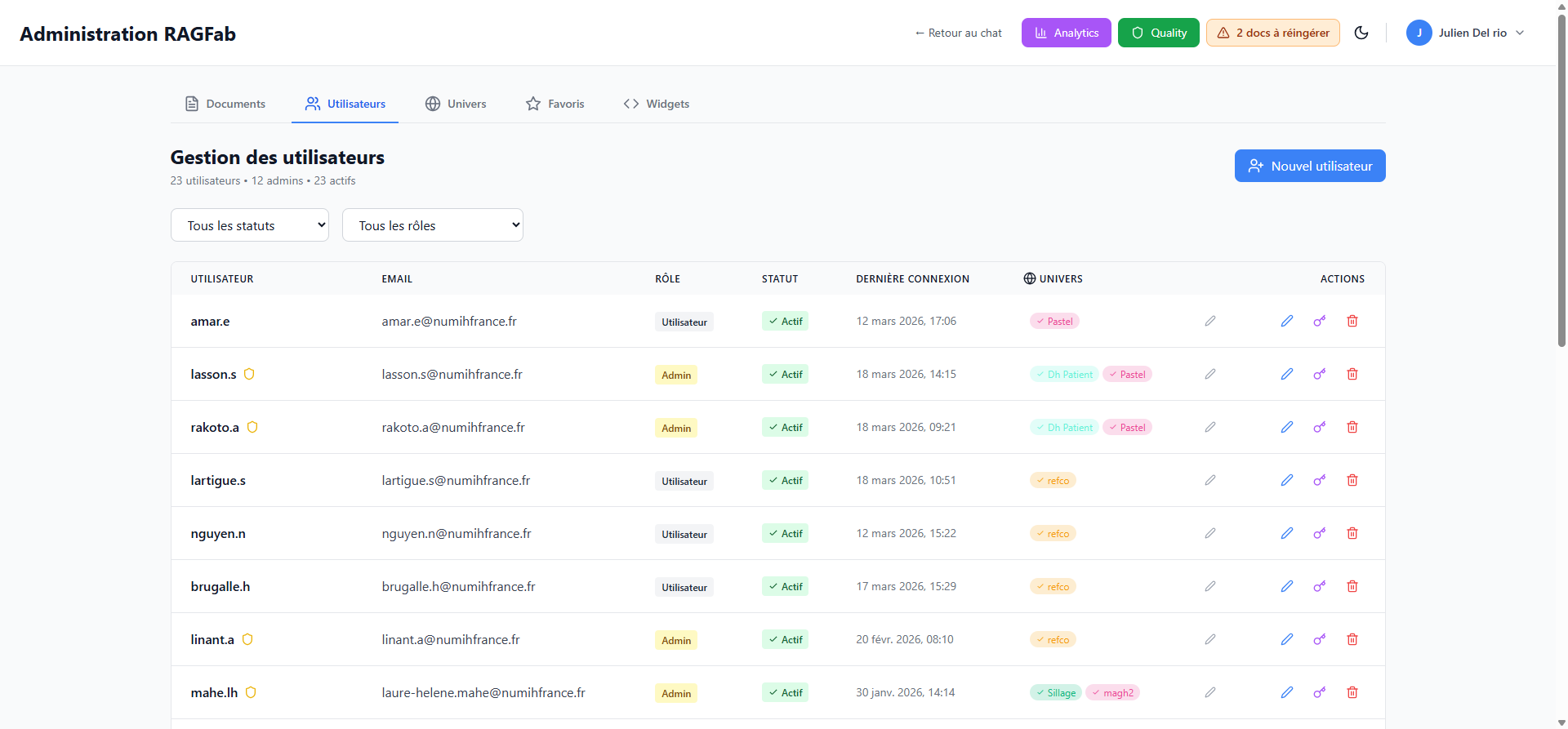
Overview
A summary is displayed at the top:
- Total number of users
- Number of admins
- Number of active users
Filter users
Two dropdowns allow filtering the list:
- By status: All, Active, Inactive
- By role: All, User, Admin
User table
| Column | Description |
|---|---|
| User | Username |
| Email address | |
| Role | User or Admin |
| Status | Active or Inactive |
| Last login | Last login date and time |
| Universes | Universes the user has access to |
| Actions | Edit, Manage access, Delete |
Create a new user
- Click Nouvel utilisateur (New user) in the top right.
- Fill in the required information:
- Username
- Password
- Role (User or Admin)
- Confirm the creation.
TIP
The user will be required to change their password on first login.
User actions
Edit a user
Click the pencil icon to edit user information (name, email, role, status).
Manage universe access
Click the link icon to grant or revoke access to product universes.
Delete a user
Click the trash icon to delete the account.
DANGER
Deleting a user is irreversible. All their conversations and data will be lost.